Financing profiles
Financing profiles are your workspace's "ways to pay": the loan or cash terms RealtyPad uses when it runs the numbers on a deal.
Open the page with Financing in the top menu, or go to /financing-profiles (/financing takes you to the same page).
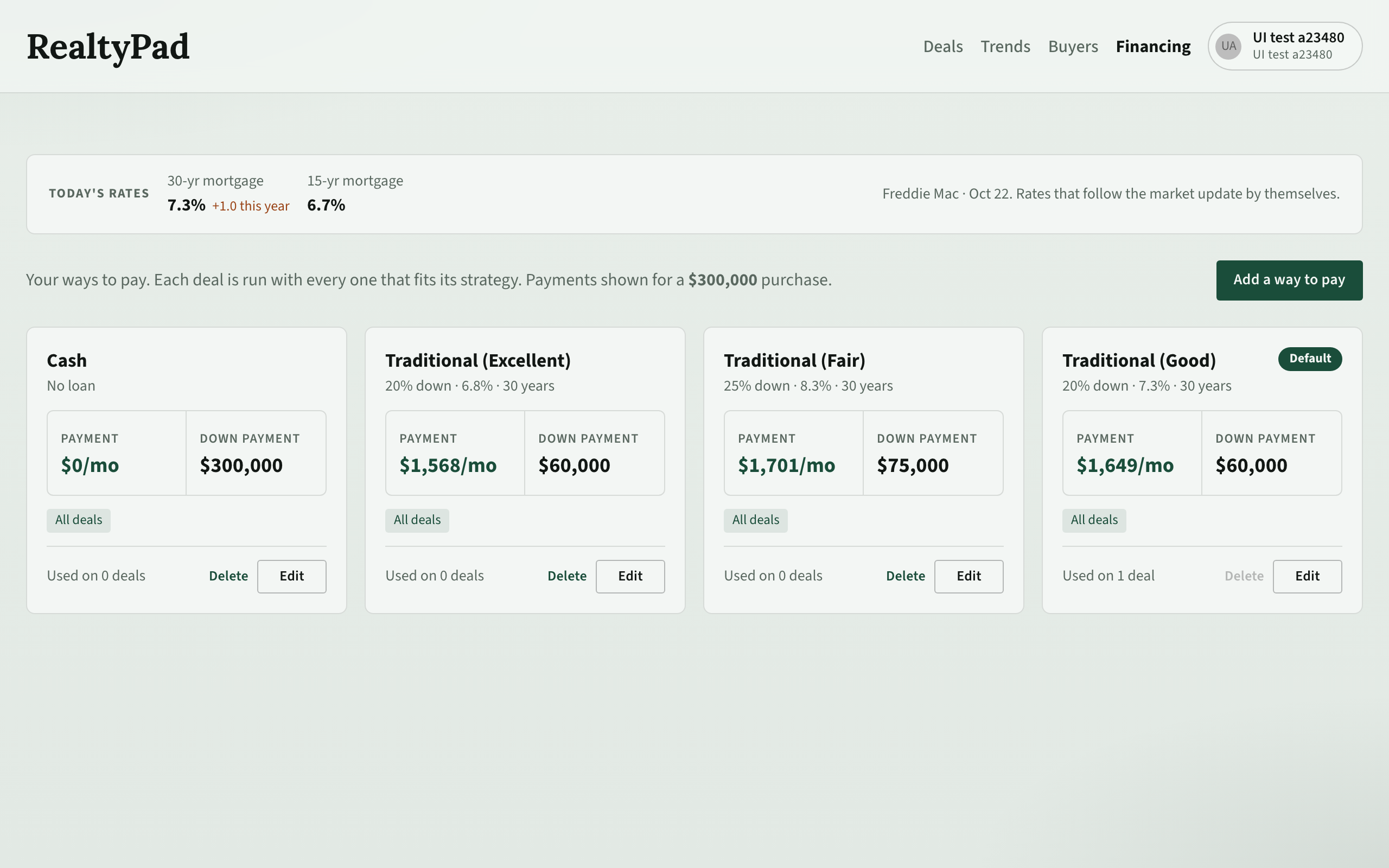
What the page shows
- Today's rates — the current national 30-yr mortgage and 15-yr mortgage rates, with the source and date. Profiles that follow the market update by themselves.
- One card per profile. Each card shows the terms (for example "20% down · 7.1% · 30 years", or "No loan" for cash), the monthly Payment and the Down payment on a sample purchase, the strategies it applies to, and Used on — how many deals use it.
Each deal is run with every profile that fits its strategy.
Starter profiles
Every new workspace gets its own copy of four profiles:
| Name | Code | Terms |
|---|---|---|
| Cash | cash_offer |
100% down, no loan. |
| Traditional (Excellent) | traditional_excellent |
20% down, 30 years, market rate − 0.5%. |
| Traditional (Good) | traditional_good |
20% down, 30 years, market rate. Marked Default. |
| Traditional (Fair) | traditional_fair |
25% down, 30 years, market rate + 1%. |
The Traditional profiles track the national 30-year rate. If that rate is not available, they use a fixed fallback rate.
Default marks Traditional (Good). You cannot delete the default profile.
Strategy defaults
When a deal has no profile picked, RealtyPad uses a default for its strategy:
| Strategy | Default profile |
|---|---|
| LTR, STR | Traditional (Good) |
| Fix & flip, Wholesale, Redevelop | Cash |
You can change the suggested profile for deals with no profile in Account → Settings → Underwriting (see Account and settings).
Edit a profile
- Click Edit on the card.
- Change the fields (see "Profile fields" below).
- Click Save.
Add a profile
- Click Add a way to pay (on a phone, + Add a way to pay at the bottom of the screen).
- Fill in the fields.
- Click Create.
Profile fields
Identity
- Code — a short id in lowercase letters, numbers and underscores (for example
austin_cash). You set it only when you create the profile. - Name and Notes.
Financing
- Loan or Cash. Cash locks the rate at 0%.
- Down payment (or Cash down) — a fraction, for example 0.20 for 20%, or 1 for all cash.
- Term (years).
- Rate mode — Fixed uses the Annual rate you enter. Excellent (−50 bps), Good (market) and Fair (+100 bps) track the national 30-year rate plus a spread. With a market mode you can set Spread (bps) (leave it blank for the band default) and a Fallback rate.
- Rates are fractions too: 0.07 means 7%.
Applicability
- Income strategies — tick the strategies this profile applies to (LTR, STR, Fix & flip, Wholesale, Redevelop). Leave all unticked to allow all strategies. The card then shows "All deals".
- Build type — limit the profile to one build type, or Any.
- Builder — limit it to one builder (for example a builder's in-house lender offer).
Delete a profile
Click Delete on the card and confirm. Deals that used it fall back to their strategy's default profile.
Buyers and financing profiles
On a buyer profile you can pick a Preferred financing profile. RealtyPad treats its rate as the rate that buyer can get when it matches deals to buyers. A cash profile marks the buyer as a cash buyer.
If you also set Max financing rate %, matching uses the lower of the two rates. See Buyers.